


Resource Name
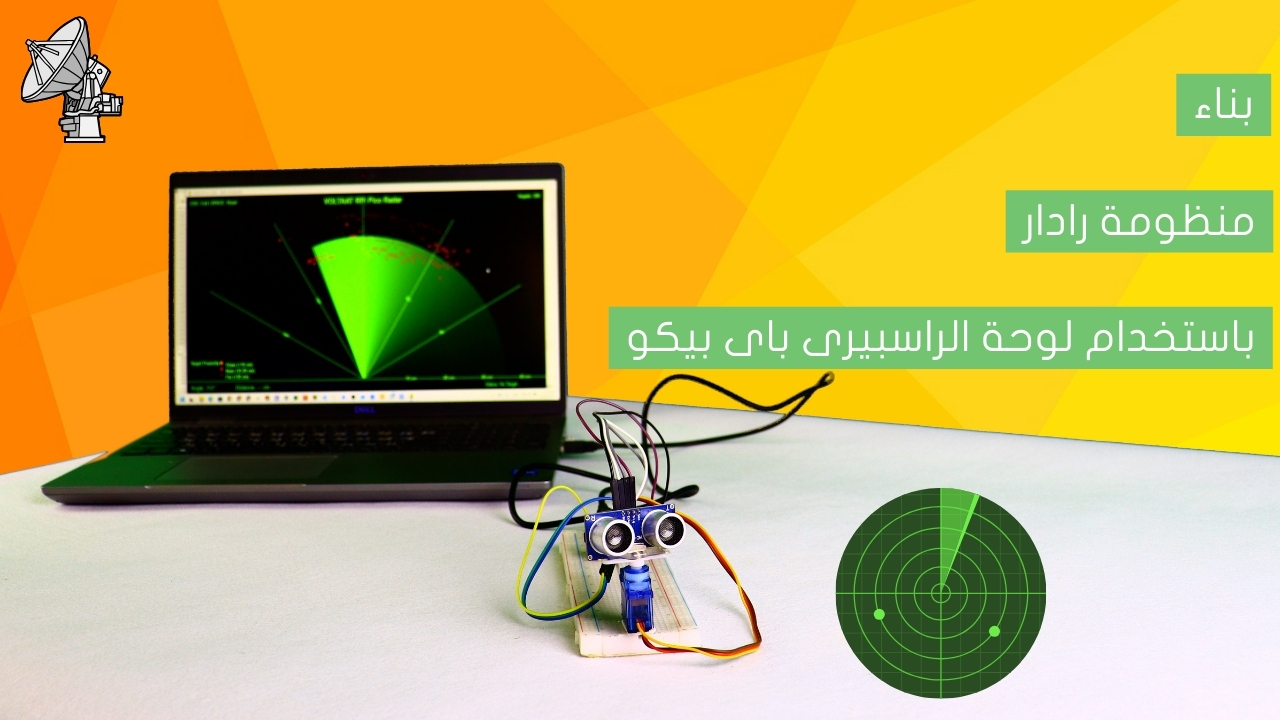
في هذا الدرس سنتعلم كيفية بناء منظومة رادار باستخدام لوحة راسبيرى باي بيكو 2W، بحيث تقوم اللوحة بمسح نطاق 180 درجة من خلال حساس موجات فوق صوتية واكتشاف الاجسام والعوائق خلال هذا النطاق، ووضع نقطة حمراء موضع كل عائق على الشاشة تمثل البعد والزاوية الموجود بها هذا العائق.

قم بتوصيل الأسلاك بين لوحة الراسبيرى باى بيكو 2W وبين حساس الموجات فوق الصوتية ومحرك السرفو كما فى الصورة التالية :
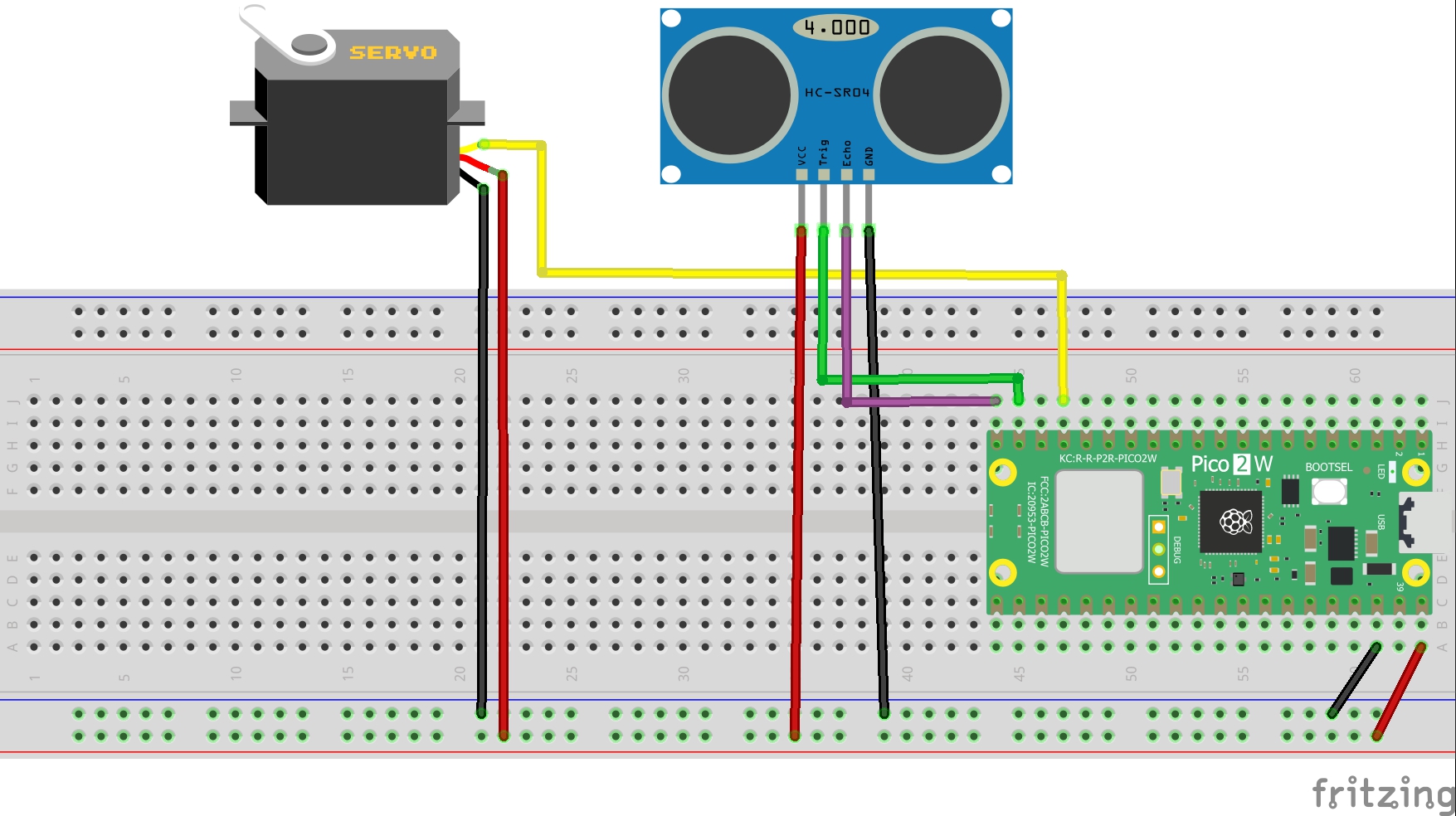
التوصيلات من لوحة راسبيرى باى بيكو 2W :
•نقوم بتوصيل منفذ ال VBUS بلوحة راسبيرى باى بيكو2W ← المنافذ الموجبة بلوحة التجارب
•منفذ ال GND بلوحة راسبيرى باى بيكو 2W ←المنافذ السالبة بلوحة التجارب
التوصيلات من حساس الموجات فوق الصوتية :
• منفذ ال VCC للحساس ← المنافذ الموجبة بلوحة التجارب
• منفذ ال GNDللحساس ← المنافذ السالبة بلوحة التجارب
• منفذ الـ TRIG للحساس ← منفذ رقم 14 في لوحة راسبيرى باى بيكو 2W
• منفذ الـ Echo للحساس ← منفذ رقم 15 في بلوحة راسبيرى باى بيكو 2W
التوصيلات من محرك السيرفو:
• المنفذ الموجب لمحرك السيرفو ← منفذ ال VBUS بلوحة راسبيرى باى بيكو 2W
• المنفذ السالب لمحرك السيرفو ← منفذ ال GND بلوحة راسبيرى باى بيكو 2W
• منفذ الإشارة لمحرك السيرفو ← منفذ رقم 13 في لوحة راسبيرى باى بيكو 2W
وظيفة النص البرمجى التالى هو مسح نطاق 180 درجة من خلال حساس موجات فوق صوتية واكتشاف الاجسام والعوائق خلال هذا النطاق، ووضع نقطة حمراء موضع كل عائق على الشاشة تمثل البعد والزاوية الموجود بها هذا العائق.
'''
Voltaat Learn (http://learn.voltaat.com)
Link to the full tutorial:
Tutorial: Building a radar system using a Raspberry Pi Pico board.
The function of this code is to It is a radar curve display showing
the location, angle, and distance of objects from the radar.
Note: You can use this sketch with any Raspberry Pi Pico.
'''
# كود Raspberry Pi Pico لمسح الرادار
# حفظ باسم: radar_pico.py
from machine import Pin, PWM, time_pulse_us
import utime
import ustruct
# تعريف دبابيس المستشعر فوق الصوتي
trigPin = Pin(14, Pin.OUT)
echoPin = Pin(15, Pin.IN)
# تعريف دبوس السيرفو (PWM)
servo_pin = Pin(13)
servo = PWM(servo_pin)
servo.freq(50) # تردد السيرفو القياسي هو 50 هرتز
# متغيرات المسافة
duration = 0
distance = 0
# دالة لتحويل الزاوية إلى دورة عمل PWM للسيرفو
def set_servo_angle(angle):
# تحويل الزاوية (0-180) إلى دورة عمل (500-2500 ميكروثانية)
duty = int((angle / 180) * 2000 + 500)
servo.duty_ns(duty * 1000) # التحويل إلى نانوثانية
utime.sleep_ms(5)
# دالة لحساب المسافة بواسطة المستشعر فوق الصوتي
def calculate_distance():
# إرسال نبضة قصيرة
trigPin.low()
utime.sleep_us(2)
trigPin.high()
utime.sleep_us(10)
trigPin.low()
# قراءة الوقت اللازم لعودة الصدى
duration = time_pulse_us(echoPin, 1, 30000) # وقت انتظار أقصاه 30000 ميكروثانية
# حساب المسافة (السرعة = 340 م/ث = 0.034 سم/ميكروثانية)
if duration > 0:
distance = (duration * 0.034) / 2
return int(distance)
else:
return 0
# دالة إرسال البيانات عبر USB
def send_data(angle, distance):
# إرسال البيانات بالصيغة: angle,distance.
data = f"{angle},{distance}.\n"
print(data)
# الإعداد الأولي
def setup():
print("جاري تهيئة نظام الرادار...")
# نقل السيرفو إلى الموضع الأولي
set_servo_angle(90)
utime.sleep(2)
print("نظام الرادار جاهز!")
print("يتم إرسال البيانات بالصيغة: angle,distance.")
# الدورة الرئيسية
def main():
setup()
while True:
# مسح من 15 إلى 165 درجة
for i in range(0, 180, 1):
set_servo_angle(i)
utime.sleep_ms(5)
distance = calculate_distance()
# إرسال البيانات عبر المنفذ التسلسلي
send_data(i, distance)
utime.sleep_ms(5)
# مسح من 165 إلى 15 درجة
for i in range(180, 0, -1):
set_servo_angle(i)
utime.sleep_ms(5)
distance = calculate_distance()
# إرسال البيانات عبر المنفذ التسلسلي
send_data(i, distance)
utime.sleep_ms(5)
# بدء البرنامج
if __name__ == "__main__":
try:
main()
except KeyboardInterrupt:
print("تم إيقاف نظام الرادار")
# إرجاع السيرفو إلى الموضع الأوسط وإيقافه
set_servo_angle(90)
utime.sleep(1)
servo.deinit()
"""
Voltaat Learn (http://learn.voltaat.com)
Tutorial: Building a radar system using a Raspberry Pi Pico board.
This script visualizes a radar sweep: shows location, angle, and distance of objects.
Works with a Raspberry Pi Pico (or can run in demo mode without serial).
"""
import pygame
import serial
import serial.tools.list_ports
import math
import sys
import re
from pygame.locals import *
# Initialize PyGame
pygame.init()
# Window dimensions
WIDTH = 1800
HEIGHT = 1000
screen = pygame.display.set_mode((WIDTH, HEIGHT))
pygame.display.set_caption("Voltaat RPi Pico Radar - Python Visualization")
# Colors
BLACK = (0, 0, 0)
GREEN = (98, 245, 31)
LIGHT_GREEN = (30, 250, 60)
RED = (255, 10, 10)
BRIGHT_RED = (255, 50, 50) # For history points
ORANGE = (255, 165, 0) # For closer targets
DARK_GREEN = (0, 100, 0)
WHITE = (255, 255, 255)
# Variables
angle = ""
distance = ""
data = ""
iAngle = 0
iDistance = 0
scanStatus = "Scanning..."
scan_history = [] # To store scan history
max_history = 200 # Increased a bit for larger window
# Fonts
pygame.font.init()
title_font = pygame.font.SysFont('Arial', 40, bold=True)
info_font = pygame.font.SysFont('Arial', 30)
small_font = pygame.font.SysFont('Arial', 25)
angle_font = pygame.font.SysFont('Arial', 20)
# Radar center (ensure ints)
radar_center_x = WIDTH // 2
radar_center_y = int(HEIGHT - HEIGHT * 0.074)
# ===== CONFIGURE SERIAL PORT HERE =====
AUTO_DETECT = True
# Option 3: Use port pattern matching
PORT_PATTERNS = [
"COM8", # Specific COM port for Windows
"COM3", "COM4", "COM5", "COM6", "COM7", "COM9", "COM10",
"/dev/ttyACM",
"/dev/ttyUSB",
"/dev/cu.usbmodem",
"/dev/cu.usbserial",
]
def setup_serial():
print("=" * 50)
print("Serial Port Configuration")
print("=" * 50)
ports = list(serial.tools.list_ports.comports())
if not ports:
print("ERROR: No serial ports found!")
print("Please connect your Raspberry Pi Pico and try again.")
return None
print("Available Serial Ports:")
print("-" * 40)
for i, port in enumerate(ports):
print(f"{i}: {port.device} - {port.description}")
print("-" * 40)
# Strategy 1: Manual port specified (if set)
if 'MANUAL_PORT' in globals() and MANUAL_PORT:
print(f"Trying manually specified port: {MANUAL_PORT}")
return try_connect_port(MANUAL_PORT)
# Strategy 2: Pattern matching
print("\nTrying pattern matching...")
for pattern in PORT_PATTERNS:
for port in ports:
if pattern in port.device:
print(f"Found port matching pattern '{pattern}': {port.device}")
ser = try_connect_port(port.device)
if ser:
return ser
# Strategy 3: Auto-detect Pico (looking for Pico/raspberry keywords)
if AUTO_DETECT:
print("\nAuto-detecting Raspberry Pi Pico...")
for port in ports:
desc_lower = (port.description or "").lower()
if ('pico' in desc_lower or
'raspberry' in desc_lower or
'serial' in desc_lower or
'usb' in desc_lower):
print(f"Potential Pico detected: {port.device} - {port.description}")
ser = try_connect_port(port.device)
if ser:
return ser
# Strategy 4: Try specific index (COM8)
print("\nTrying specific port index (COM8)...")
try:
for port in ports:
if "COM8" in port.device:
print(f"Found COM8: {port.device}")
ser = try_connect_port(port.device)
if ser:
return ser
if len(ports) > 8:
port_name = ports[8].device
print(f"Trying port at index 8: {port_name}")
return try_connect_port(port_name)
except Exception as e:
print(f"Error with specific index: {e}")
# Strategy 5: Try all ports
print("\nTrying all available ports...")
for port in ports:
print(f"Trying port: {port.device}")
ser = try_connect_port(port.device)
if ser:
return ser
print("\nERROR: Could not connect to any serial port!")
print("\nTroubleshooting tips:")
print("1. Make sure Raspberry Pi Pico is connected via USB")
print("2. Check if Pico has MicroPython installed and running")
print("3. Try unplugging and re-plugging the USB cable")
print("4. Check Device Manager (Windows) or ls /dev/tty* (Linux/Mac)")
print("5. Modify the PORT_PATTERNS list in the code with your port")
return None
def try_connect_port(port_name):
"""Try to connect to a specific port"""
try:
print(f"Connecting to {port_name}...")
ser = serial.Serial(
port=port_name,
baudrate=9600,
bytesize=serial.EIGHTBITS,
parity=serial.PARITY_NONE,
stopbits=serial.STOPBITS_ONE,
timeout=1,
write_timeout=1
)
if ser.is_open:
print(f"✓ Successfully connected to {port_name}")
print(f"Port settings: {ser.name}, {ser.baudrate} baud")
return ser
except serial.SerialException as e:
print(f"✗ Failed to connect to {port_name}: {e}")
except Exception as e:
print(f"✗ Error with {port_name}: {e}")
return None
# Draw radar circle and static lines
def draw_radar():
# Draw arcs (partial circles)
arc_radius = [(WIDTH - WIDTH * 0.0625) // 2,
(WIDTH - WIDTH * 0.27) // 2,
(WIDTH - WIDTH * 0.479) // 2,
(WIDTH - WIDTH * 0.687) // 2]
for radius in arc_radius:
pygame.draw.arc(screen, GREEN,
(radar_center_x - radius, radar_center_y - radius,
radius * 2, radius * 2),
math.pi, 2 * math.pi, 2)
# Draw angle radial lines
line_length = WIDTH // 2
angles = [0, 30, 60, 90, 120, 150, 180]
for angle_deg in angles:
angle_rad = math.radians(angle_deg)
end_x = radar_center_x + line_length * math.cos(angle_rad)
end_y = radar_center_y - line_length * math.sin(angle_rad)
pygame.draw.line(screen, GREEN, (radar_center_x, radar_center_y),
(end_x, end_y), 2)
# Draw sweeping translucent sector (visual sweep)
def draw_sweep():
sweep_width_deg = 20 # width of sweep in degrees
# we clamp start and end between 0 and 180 (semi-circle)
start_deg = max(0, int(iAngle - sweep_width_deg))
end_deg = min(180, int(iAngle))
line_length = (HEIGHT - HEIGHT * 0.12) * 0.8
points = [(radar_center_x, radar_center_y)]
for deg in range(start_deg, end_deg + 1):
rad = math.radians(deg)
x = radar_center_x + line_length * math.cos(rad)
y = radar_center_y - line_length * math.sin(rad)
points.append((int(x), int(y)))
sweep_surf = pygame.Surface((WIDTH, HEIGHT), pygame.SRCALPHA)
sweep_color = (30, 250, 60, 40) # RGBA with alpha
if len(points) >= 3:
pygame.draw.polygon(sweep_surf, sweep_color, points)
screen.blit(sweep_surf, (0, 0))
# Draw scanning line (active beam)
def draw_line():
line_length = (HEIGHT - HEIGHT * 0.12) * 0.8
angle_rad = math.radians(iAngle)
end_x = radar_center_x + line_length * math.cos(angle_rad)
end_y = radar_center_y - line_length * math.sin(angle_rad)
pygame.draw.line(screen, LIGHT_GREEN,
(radar_center_x, radar_center_y),
(end_x, end_y), 9)
# Draw detected objects
def draw_object():
if iDistance < 40 and iDistance > 0:
# Convert distance from cm to pixels
pixs_distance = iDistance * ((HEIGHT - HEIGHT * 0.1666) * 0.025)
angle_rad = math.radians(iAngle)
# Calculate object position
obj_x = radar_center_x + pixs_distance * math.cos(angle_rad)
obj_y = radar_center_y - pixs_distance * math.sin(angle_rad)
# Determine point size and color based on distance
if iDistance <= 10: # Very close - bigger and brighter
point_size = 14
point_color = ORANGE
elif iDistance <= 20: # Close - medium size
point_size = 12
point_color = RED
else: # Far - smaller
point_size = 10
point_color = RED
# Draw object as a point WITHOUT the red line
pygame.draw.circle(screen, point_color, (int(obj_x), int(obj_y)), point_size)
# Draw a small white center for better visibility
pygame.draw.circle(screen, WHITE, (int(obj_x), int(obj_y)), point_size // 3)
# Store point in history
scan_history.append((obj_x, obj_y, iAngle, iDistance, point_color))
if len(scan_history) > max_history:
scan_history.pop(0)
# Draw scan history (fades with time)
for i, (x, y, angle_val, dist, color) in enumerate(scan_history):
fade_factor = 1.0 - (i / len(scan_history) * 0.7) if len(scan_history) > 0 else 1.0
if color == RED:
faded_color = (
int(255 * fade_factor),
int(50 * fade_factor),
int(50 * fade_factor)
)
elif color == ORANGE:
faded_color = (
int(255 * fade_factor),
int(165 * fade_factor * 0.8),
0
)
else:
faded_color = (
int(color[0] * fade_factor),
int(color[1] * fade_factor),
int(color[2] * fade_factor)
)
if dist < 40:
point_size = max(2, int(6 * (1.0 - i/len(scan_history) * 0.5)))
pygame.draw.circle(screen, faded_color, (int(x), int(y)), point_size)
# Draw text and information
def draw_text():
global scanStatus
# Bottom information bar
info_bar_height = HEIGHT * 0.08
info_bar_rect = pygame.Rect(0, HEIGHT - info_bar_height, WIDTH, info_bar_height)
pygame.draw.rect(screen, BLACK, info_bar_rect)
# Distance labels
distance_labels = ["10 cm", "20 cm", "30 cm", "40 cm"]
distance_positions = [WIDTH - WIDTH * 0.3854,
WIDTH - WIDTH * 0.281,
WIDTH - WIDTH * 0.177,
WIDTH - WIDTH * 0.0729]
for label, x_pos in zip(distance_labels, distance_positions):
text = small_font.render(label, True, GREEN)
screen.blit(text, (x_pos, HEIGHT - HEIGHT * 0.09))
# Title
title_text = title_font.render("VOLTAAT RPi Pico Radar", True, GREEN)
title_rect = title_text.get_rect(center=(WIDTH // 2, 40))
screen.blit(title_text, title_rect)
# Angle display
angle_text = info_font.render(f"Angle: {iAngle}°", True, GREEN)
angle_rect = angle_text.get_rect()
angle_rect.topleft = (20, HEIGHT - info_bar_height + 20)
screen.blit(angle_text, angle_rect)
# Distance display and status
if iDistance < 40 and iDistance > 0:
if iDistance <= 10:
dist_color = ORANGE
proximity = "CLOSE"
elif iDistance <= 20:
dist_color = RED
proximity = "NEAR"
else:
dist_color = GREEN
proximity = "FAR"
distance_text = info_font.render(f"Distance: {iDistance} cm [{proximity}]", True, dist_color)
scanStatus = "Target Detected"
else:
distance_text = info_font.render("Distance: --- cm", True, GREEN)
scanStatus = "No Target"
distance_rect = distance_text.get_rect()
distance_rect.topleft = (250, HEIGHT - info_bar_height + 20)
screen.blit(distance_text, distance_rect)
# Scan status
status_text = small_font.render(f"Status: {scanStatus}", True, LIGHT_GREEN)
status_rect = status_text.get_rect()
status_rect.topleft = (WIDTH - 300, HEIGHT - info_bar_height + 25)
screen.blit(status_text, status_rect)
# Angle tick labels
angles = [30, 60, 90, 120, 150]
for angle_val in angles:
angle_rad = math.radians(angle_val)
radius = (WIDTH - WIDTH * 0.5) // 2
x = radar_center_x + radius * math.cos(angle_rad)
y = radar_center_y - radius * math.sin(angle_rad)
angle_text = angle_font.render(f"{angle_val}°", True, LIGHT_GREEN)
if angle_val <= 90:
rotated_text = pygame.transform.rotate(angle_text, -angle_val)
else:
rotated_text = pygame.transform.rotate(angle_text, -(180 - angle_val))
text_rect = rotated_text.get_rect(center=(int(x), int(y)))
screen.blit(rotated_text, text_rect)
# Top-left info
info_text = small_font.render("ESC: Exit | SPACE: Reset", True, GREEN)
info_rect = info_text.get_rect()
info_rect.topleft = (20, 20)
screen.blit(info_text, info_rect)
# Targets count
history_text = small_font.render(f"Targets: {len(scan_history)}", True, GREEN)
history_rect = history_text.get_rect()
history_rect.topright = (WIDTH - 20, 20)
screen.blit(history_text, history_rect)
# Legend bottom-left
legend_y = HEIGHT - info_bar_height - 100
legend_text = small_font.render("Target Proximity:", True, GREEN)
screen.blit(legend_text, (20, legend_y))
pygame.draw.circle(screen, ORANGE, (180, legend_y + 15), 8)
legend_close = small_font.render("Close (<10 cm)", True, GREEN)
screen.blit(legend_close, (200, legend_y + 10))
pygame.draw.circle(screen, RED, (180, legend_y + 45), 6)
legend_near = small_font.render("Near (10-20 cm)", True, GREEN)
screen.blit(legend_near, (200, legend_y + 40))
pygame.draw.circle(screen, (200, 0, 0), (180, legend_y + 75), 4)
legend_far = small_font.render("Far (>20 cm)", True, GREEN)
screen.blit(legend_far, (200, legend_y + 70))
# Re-draw the bottom horizontal line so it stays visible above the info bar
def draw_bottom_horizontal():
line_length = WIDTH // 2
pygame.draw.line(screen, GREEN,
(radar_center_x - line_length, radar_center_y),
(radar_center_x + line_length, radar_center_y), 2)
# Process data from serial port
def parse_serial_data(ser):
global iAngle, iDistance
if ser and ser.in_waiting > 0:
try:
data = ser.read_until(b'.').decode('utf-8', errors='ignore')
if data and ',' in data:
data = data.strip()
if data.endswith('.'):
data = data[:-1]
parts = data.split(',')
if len(parts) >= 2:
angle_str = parts[0].strip()
distance_str = parts[1].strip()
try:
iAngle = int(angle_str)
iDistance = int(distance_str)
if iAngle % 15 == 0:
print(f"Data: Angle={iAngle}°, Distance={iDistance}cm")
except ValueError:
pass
except Exception as e:
print(f"Error reading data: {e}")
# Main
def main():
global iAngle, iDistance, scan_history
ser = setup_serial()
if not ser:
print("Working without serial connection...")
clock = pygame.time.Clock()
FPS = 60
fade_surface = pygame.Surface((WIDTH, HEIGHT))
fade_surface.set_alpha(4)
running = True
while running:
for event in pygame.event.get():
if event.type == QUIT:
running = False
elif event.type == KEYDOWN:
if event.key == K_ESCAPE:
running = False
elif event.key == K_SPACE:
iAngle = 0
iDistance = 0
scan_history = []
print("Radar reset")
# Read serial or animate sweep if no serial
if ser:
parse_serial_data(ser)
else:
# simple demo sweep when no serial device
iAngle = (iAngle + 1) % 181 # sweep 0..180
# background fade effect
screen.blit(fade_surface, (0, 0))
fade_surface.fill(BLACK)
# draw layers
draw_radar()
draw_sweep()
draw_line()
draw_object()
draw_text()
# re-draw bottom horizontal so it stays visible above info bar
draw_bottom_horizontal()
pygame.display.flip()
clock.tick(FPS)
if ser:
ser.close()
pygame.quit()
sys.exit()
if __name__ == "__main__":
main()
بعد رفع النص البرمجى على اللوحة قم بتشغيل الكود الخاص باظهار منحنى الرادار على الشاشة وسوف تجد نافذة بها منحنى الرادار تظهر على الشاشة، حينئذ قم بوضع اى جسم امام الرادار وسوف تجد انه يتم رسم نقاط حمراء عند موضع هذا الجسم على الشاشة.